
ggmap으로 spatial 데이터 분석을 해보기 위해서 데이터를 찾던 중 기상청에서 제공하는 지진 통계 데이터를 가지고 하면 어떨까 하는 생각에 1978년도부터 지진 데이터를 가지고 플로팅을 해보기로 했다.
ggmap은 google map 뿐만 아니라 openstreet map, stamen design, cloud made map 을 소스로 사용해 spatial 데이터 분석을 할 수 있는 패키지로 최근 ggplot2를 기반으로 layering 시스템을 채용해 ggplot2를 사용해본 사용자들이 아주 쉽게 접근할 수 있는 장점을 제공하고 있다.
필자 경험상 ggmap을 플로팅한 결과를 R markdown으로 컨버팅시 connection close문제가 발생해 아직 markdown으로 변환은 힘든 상황이지만 블로그에 올릴정도의 그래프는 생성할 수 있다.
일단 기상청 지진 센터에서 데이터를 가져와 엑셀에서 필드 편집을 해 R에서 로딩하기 쉬운 형식으로 만들었다. 파일은 여기에 올려 두었다.
코드는 아래와 같다.
library(ggmap)
library(lubridate)

eq <- read.table("https://dl.dropbox.com/u/8686172/eq.csv", sep="\t", header=T, stringsAsFactors=F)

summary(eq)

eq$latitude <- unlist(strsplit(eq$latitude, " "))[seq(from=1,to=nrow(eq), by=2)]
eq$longitude <- unlist(strsplit(eq$longitude, " "))[seq(from=1,to=nrow(eq), by=2)]


eq$longitude <- as.double(eq$longitude)
eq$latitude <- as.double(eq$latitude)
eq$year <- as.factor(substr(eq$date,1,4))
eq$date <- ymd_hm(eq$date)

ggmap(get_googlemap(center = 'korea', zoom=6, maptype='terrain'),extent='device', fullpage = TRUE) +
  geom_point(aes(x=longitude, y=latitude, size=power, colour=date), data = eq, alpha = .7) +
  scale_x_date("10 years") +
  geom_density2d(aes(x=longitude, y=latitude), data=eq)


ggmap(get_googlemap(center = 'korea', zoom=7, maptype='terrain'),extent='device') +
  geom_point(aes(x=longitude, y=latitude, size=power, colour=date), data = eq, alpha = .7) +
  scale_x_date("10 years") +
  geom_density2d(aes(x=longitude, y=latitude), data=eq)


library(plyr)
library(ggplot2)
eqcnt <- ddply(eq, .(year),summarise, shock=mean(power), freq=length(power))


ggplot(eqcnt, aes(year, freq)) + geom_point(aes(size=shock),colour="blue") + geom_line(aes(group=1), colour="red") +
  ylab("지진빈도") + opts(axis.text.x=theme_text(angle=90, hjust=1))

ggplot(eq,aes(x=year,y=power)) + geom_boxplot() + opts(axis.text.x=theme_text(angle=90, hjust=1)) + ylab("진도")
이렇게 나온 그래프는 아래와 같다.
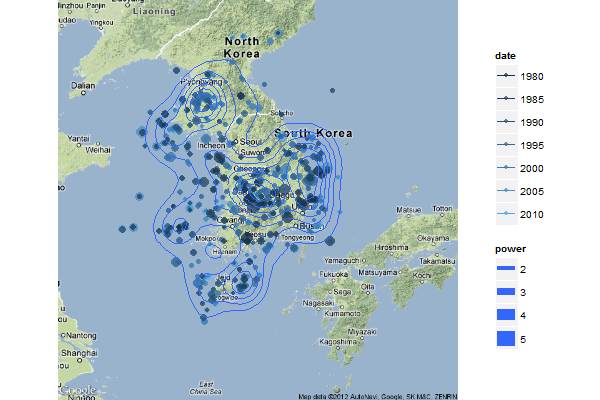
밀도함수를 적용해서 플로팅 했기 때문에 통계적으로 어느 위치에 집중적으로 지진이 나왔는지 확인 가능하다. 재밋는 사실은 시간 간격은 있지만 거의 유사한 위치에 빈번하게 지진이 발생하는 데이터를 많이 볼 수 있는데, 될 수 있으면 그런 지역에 거주하는건 피해야 되는게 아닐까 한다.
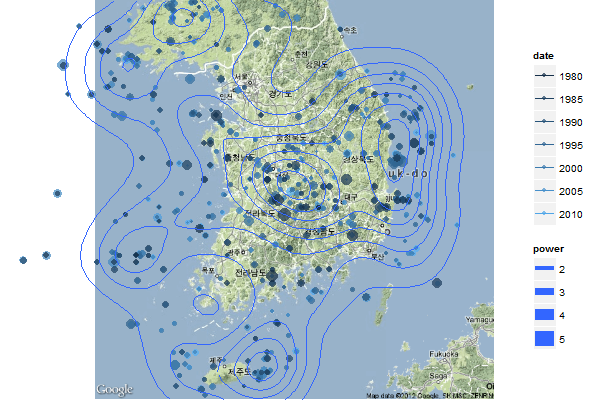
좀더 상세한 지도이다.
대전부근에서 지진이 많이 발생하며, 포항쪽 그리고 제주도 동해상에 많은 지진이 나왔음을 알 수 있다.
인구집중 지역인 서울은 그리 많은 지진이 나지 않는다는 것을 알 수 있다.
년도별 지진 발생 횟수를 보면 아래와 같다.,
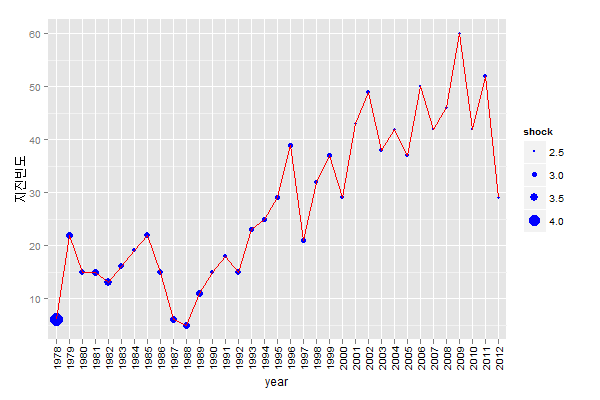
시간이 갈수록 지진 발생 횟수가 상승함을 알 수 있으나, 그 진도(shock)의 파워가 상승하는 기미는 보이지 않으나 이 부분은 좀 파악이 필요한 부분이다.
각 년도별로 진도의 분포가 궁금해 진다.
그러기 위해 아래 그래프를 그려본다.
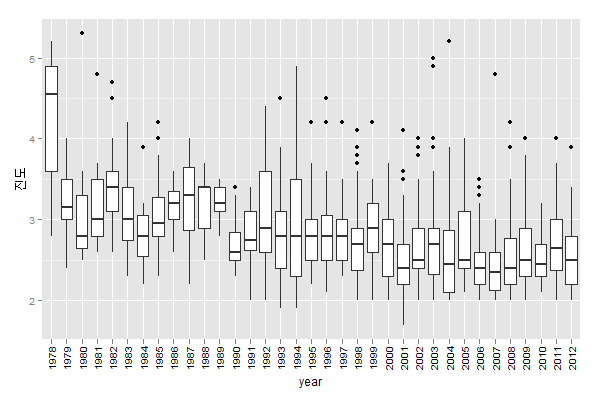
재밋는 사실은 대부분의 해에 outlier가 존재한다는건데, 이건 지진 예측이 왜 힘든건지 알려주는 한 단서가 아닐까 한다.
다행스럽게도 지진 빈도는 해가 갈수록 늘어나지만 지진의 진도는 상승 기세가 보이지 않는거 같다.
내가 해본 분석은 spatial 데이터 분석의 기초이다. 좀더 상세한 분석은 관련 공부를 좀 해야 한다.
ps. 이 글에서 power, shock은 진도와 같은 의미로 사용되었다. 귀찮아서 그래프 고치기 싫어서 혼용했으니 양해 부탁드린다.
R이 궁금하여 구글 검색하다가 좋은 예제를 보게되었네요.그런데 아래와 같이 에러가 납니다. 어디를 수정해야만 하는지 궁금합니다… > eq$date
> ggmap(get_googlemap(center = ‘korea’, zoom=6, maptype=’terrain’),extent=’device’, fullpage = TRUE) +
+ geom_point(aes(x=longitude, y=latitude, size=power, colour=date), data = eq, alpha = .7) +
+ scale_x_date(“10 years”) +
+ geom_density2d(aes(x=longitude, y=latitude), data=eq)
에러:mapproj package required for this functionality. Please install and try again.
추가정보:경고 메시지가 손실되었습니다
fullpage and expand syntaxes deprecated, use extent.
>
> head(eq$date)
[1] “2012-06-24 01:20:00 UTC” “2012-06-23 16:42:00 UTC” “2012-06-19 20:55:00 UTC”
[4] “2012-06-14 06:15:00 UTC” “2012-06-12 17:52:00 UTC” “2012-06-12 13:34:00 UTC”
install.packages(“mapproj”)위 명령어를 실행하신 후 다시 시행해 보시기 바랍니다.
Scale for ‘x’ is already present. Adding another scale for ‘x’, which will replace the existing scale.에러:Invalid input: date_trans works with objects of class Date only추가정보:경고 메시지가 손실되었습니다fullpage and expand syntaxes deprecated, use extent.
아래 패키지를 설치하고 적용하였더니, 또다른 에러가 발생해서요…
좋은 자료 잘 보았습니다. 강원도쪽과 홍성등지가 위험해 보이는데 이 지도상으로 보면 충청남도 대전부근도 위험하군여
네.. 그렇지요..
안녕하세요 관리자님. 언제나 좋은 정보 감사드려요,
한가지 문의 드리고 싶은게 있습니다만,
기상청의 지진데이터를
지반의 동적 유효응력해석(UWLC)로 넣고 싶은데,
파형밖에 나오지 않는군요. 그래서 이것을 지진연구소의 Analyst를 이용해야 하는데 이 방법말고, 기상청의 가속도 데이터를 엑셀등에서 이용할수 있게 수치화 할수 있는 방법이 있을까요?
제가 지진에 대한 전문적인 지식이 없는 관계로 답변을 드리기 힘들것 같습니다.
죄송합니다.
안녕하세요.
비슷한 그림을 그려야 해서 코드를 따라하던중에 no layers in plot 에러를 만났는데, 어떻게 해야 할까요?
> ggplot(eq,aes(x=year,y=power))
에러: No layers in plot
이렇게 나오면서 map 위에 plot이 안 그려집니다…
전체는 다음과 같습니다.
> library(ggmap)
필요한 패키지를 로딩중입니다: ggplot2
> library(lubridate)
>
> eq
> summary(eq)
date power latitude longitude
Length:978 Min. :1.700 Length:978 Length:978
Class :character 1st Qu.:2.400 Class :character Class :character
Mode :character Median :2.700 Mode :character Mode :character
Mean :2.769
3rd Qu.:3.000
Max. :5.300
place
Length:978
Class :character
Mode :character
>
> eq$latitude eq$longitude
>
> eq$longitude eq$latitude eq$year eq$date
> ggmap(get_googlemap(center = ‘korea’, zoom=6, maptype=’terrain’),extent=’device’, fullpage = TRUE)
Map from URL : http://maps.googleapis.com/maps/api/staticmap?center=korea&zoom=6&size=%20640×640&maptype=terrain&sensor=false
Google Maps API Terms of Service : http://developers.google.com/maps/terms
Information from URL : http://maps.googleapis.com/maps/api/geocode/json?address=korea&sensor=false
Google Maps API Terms of Service : http://developers.google.com/maps/terms
경고메시지:
fullpage and expand syntaxes deprecated, use extent.
> geom_point(aes(x=longitude, y=latitude, size=power, colour=date), data = eq, alpha = .7)
mapping: x = longitude, y = latitude, size = power, colour = date
geom_point: na.rm = FALSE, alpha = 0.7
stat_identity:
position_identity: (width = NULL, height = NULL)
> scale_x_date(“10 years”)
continuous_scale(aesthetics = aesthetics, scale_name = “date”,
palette = identity, name = “10 years”, breaks = breaks, minor_breaks = minor_breaks,
expand = expand, trans = “date”, guide = “none”)
> geom_density2d(aes(x=longitude, y=latitude), data=eq)
mapping: x = longitude, y = latitude
geom_density2d: lineend = butt, linejoin = round, linemitre = 1, na.rm = FALSE
stat_density2d:
position_identity: (width = NULL, height = NULL)
>
>
> ggmap(get_googlemap(center = ‘korea’, zoom=7, maptype=’terrain’),extent=’device’)
Map from URL : http://maps.googleapis.com/maps/api/staticmap?center=korea&zoom=7&size=%20640×640&maptype=terrain&sensor=false
Google Maps API Terms of Service : http://developers.google.com/maps/terms
Information from URL : http://maps.googleapis.com/maps/api/geocode/json?address=korea&sensor=false
Google Maps API Terms of Service : http://developers.google.com/maps/terms
> geom_point(aes(x=longitude, y=latitude, size=power, colour=date), data = eq, alpha = .7)
mapping: x = longitude, y = latitude, size = power, colour = date
geom_point: na.rm = FALSE, alpha = 0.7
stat_identity:
position_identity: (width = NULL, height = NULL)
> scale_x_date(“10 years”)
continuous_scale(aesthetics = aesthetics, scale_name = “date”,
palette = identity, name = “10 years”, breaks = breaks, minor_breaks = minor_breaks,
expand = expand, trans = “date”, guide = “none”)
> geom_density2d(aes(x=longitude, y=latitude), data=eq)
mapping: x = longitude, y = latitude
geom_density2d: lineend = butt, linejoin = round, linemitre = 1, na.rm = FALSE
stat_density2d:
position_identity: (width = NULL, height = NULL)
>
>
> library(plyr)
다음의 패키지를 부착합니다: ‘plyr’
The following object is masked from ‘package:lubridate’:
here
> library(ggplot2)
> eqcnt
>
> ggplot(eqcnt, aes(year, freq))
에러: No layers in plot
> geom_point(aes(size=shock),colour=”blue”)
mapping: size = shock
geom_point: na.rm = FALSE, colour = blue
stat_identity:
position_identity: (width = NULL, height = NULL)
> geom_line(aes(group=1), colour=”red”)
mapping: group = 1
geom_line: colour = red
stat_identity:
position_identity: (width = NULL, height = NULL)
> ylab(“지진빈도”)
$y
[1] “지진빈도”
attr(,”class”)
[1] “labels”
> opts(axis.text.x=theme_text(angle=90, hjust=1))
‘opts’ is deprecated. Use ‘theme’ instead. (Deprecated; last used in version 0.9.1)
theme_text is deprecated. Use ‘element_text’ instead. (Deprecated; last used in version 0.9.1)
List of 1
$ axis.text.x:List of 8
..$ family : NULL
..$ face : NULL
..$ colour : NULL
..$ size : NULL
..$ hjust : num 1
..$ vjust : NULL
..$ angle : num 90
..$ lineheight: NULL
..- attr(*, “class”)= chr [1:2] “element_text” “element”
– attr(*, “class”)= chr [1:2] “theme” “gg”
– attr(*, “complete”)= logi FALSE
>
> ggplot(eq,aes(x=year,y=power))
에러: No layers in plot
> geom_boxplot()
geom_boxplot: outlier.colour = black, outlier.shape = 16, outlier.size = 2, notch = FALSE, notchwidth = 0.5
stat_boxplot:
position_dodge: (width = NULL, height = NULL)
> opts(axis.text.x=theme_text(angle=90, hjust=1))
‘opts’ is deprecated. Use ‘theme’ instead. (Deprecated; last used in version 0.9.1)
theme_text is deprecated. Use ‘element_text’ instead. (Deprecated; last used in version 0.9.1)
List of 1
$ axis.text.x:List of 8
..$ family : NULL
..$ face : NULL
..$ colour : NULL
..$ size : NULL
..$ hjust : num 1
..$ vjust : NULL
..$ angle : num 90
..$ lineheight: NULL
..- attr(*, “class”)= chr [1:2] “element_text” “element”
– attr(*, “class”)= chr [1:2] “theme” “gg”
– attr(*, “complete”)= logi FALSE
> ylab(“진도”)
$y
[1] “진도”
attr(,”class”)
[1] “labels”
>
안녕하세요 좋은 글 잘 보았습니다. 지진 데이터가 나타나 있는 지도를 찾던 중이었는데 이런 식으로도 구현이 가능하군요! 제가 과제의 일환으로 지진 데이터를 시각화하려고 하는데, 올려주신 기상청의 지진 데이터 엑셀 파일을 사용해도 괜찮을까요?
출처만 명시해 주시면 상관없습니다. ^^
어렵게 만드신 자료일텐데 허락해 주셔서 감사합니다^^ 잘 쓰고 출처도 정확히 명시하겠습니다 감사합니다!
[…] 한국 지진 데이터 시각화 […]
저도 scale_x_date 부분에서 에러가 나네요ㅠㅠㅠㅠ
저 혹시 기상청에서 지진 데이터 엑셀파일로 어떻게 불러오셨나요? 지금 여긴 2012년까지 밖에 없던데 저는 최근 2016년까지 모두 불러오고 싶어서요
저 혹시 기상청에서 지진 데이터 엑셀파일로 어떻게 불러오셨나요? 지금 여긴 2012년까지 밖에 없던데 저는 최근 2016년까지 모두 불러오고 싶어서요
홋카이도에서 지진 발생 그래서 한국 지진 예측
검색하면
지진 예측이 가능하다는 걸 보는데요
과연 맞을까 생각합니다만
도표가 대만이나 홋카이도에서 오는 단층선에
한국 육지가 눌리는 걸 보는데요
아무튼 이 예상이 맞다면 곧 지진이 발생하겠네요
데이터가 막혔는데 다시 얻을 수 있는 방법은 없을까요? ㅜㅜ 과제하는데 꼭 쓰고싶습니다.